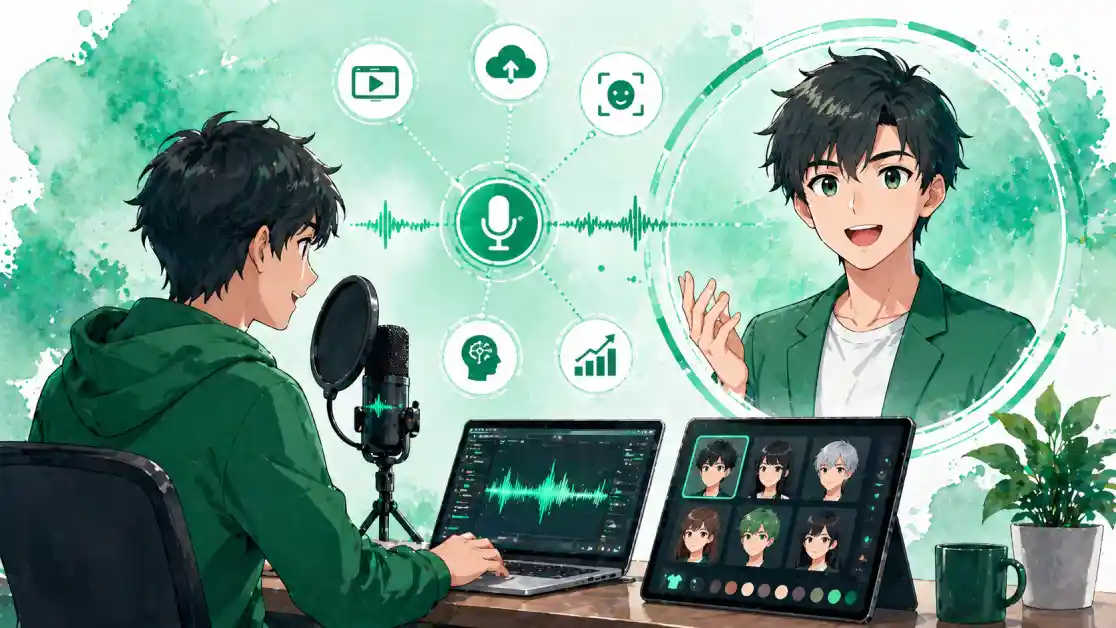
The idea of a personalized animated avatar that moves and speaks in sync with your voice used to belong exclusively to big-budget animation studios and enterprise software suites. Today, a growing number of platforms offer free and accessible tools that let creators, educators, business owners, and everyday users build animated avatars directly from voice recordings, with no technical background required. The result is a new category of content that feels personal, engaging, and scalable, without the time or cost of traditional video production. This guide covers everything you need to know about finding the right platform, recording great audio, and producing an animated avatar that represents you well across any context.
Why Animated Avatars From Voice Recordings Are Changing Content Creation
An animated avatar is more than a visual novelty. It is a representation of presence, a way to put a face and voice to your content without requiring on-camera video. For creators who are camera-shy, working in environments that are not visually polished, or simply looking for a faster production method, a voice-driven animated avatar offers a genuine alternative to traditional talking-head video. The avatar speaks when you speak, moves when you move, and can be designed to reflect your personality, brand identity, or creative vision.
The voice recording component is what gives this format its efficiency advantage. Rather than setting up lights, checking framing, and managing background clutter, a creator records audio and the platform handles the animation automatically. For educational content, explainer videos, social media posts, podcast companion visuals, and customer-facing communications, this workflow can reduce production time from hours to minutes, delivering a consistent, repeatable visual identity that can be updated with new audio as often as needed.
The growth of this format has also been driven by the expanding use of digital avatars in professional settings. Remote work has normalized the idea of a visual representation that is not a live video feed, and virtual meetings, asynchronous video messages, and digital-first communication channels have created genuine demand for animated identities that can be used consistently across platforms. Free avatar tools have made it possible for independent creators and small teams to participate in this space without enterprise budgets.
What Separates a Good Free Avatar Platform From a Basic One
Free avatar tools vary widely in what they offer at no cost, and the gap between a useful free tier and a frustrating one can be significant. The most important factors to evaluate are animation quality, voice sync accuracy, avatar customization depth, export options, and the range of use cases the free tier actually supports.
Animation quality refers to how naturally the avatar moves in response to voice input. Low-quality animation produces robotic lip movements and stiff facial expressions that undermine the personal quality the avatar is supposed to create. The best free platforms use AI-driven animation models trained on real human facial movement data, which produces much more convincing results. When evaluating a platform, test it with a sample recording before committing significant time to customization. The animation quality of your initial test will be representative of what you get on every subsequent recording.
Voice sync accuracy is closely related but distinct. A platform can produce smooth animation overall while still missing the precise synchronization between spoken sounds and lip movements that makes the result feel authentic. Accurate lip sync requires the platform’s animation model to correctly interpret the phonetic content of the audio, not just its volume or timing. Platforms built specifically for voice-driven avatar animation tend to outperform general-purpose tools in this area.
Customization depth on the free tier determines how personally the avatar can represent you. A platform that locks most appearance options behind a paid subscription leaves free users with generic, undifferentiated avatars that do not serve the purpose of personal branding. Look for platforms where the free tier includes meaningful control over facial features, hair, skin tone, and clothing, as well as the ability to save a customized avatar and reuse it across multiple recordings without rebuilding it from scratch.
10 Tips for Creating a Personalized Animated Avatar From a Voice Recording
1. Record in the Quietest Space Available to You
The quality of your voice recording has a direct and significant impact on the quality of your animated avatar’s lip sync. Background noise, room echo, and audio interference all degrade the platform’s ability to correctly interpret your speech, which produces less accurate lip movements and lower-quality animation. The single most effective improvement most creators can make to their avatar output is improving their recording environment before they record anything.
You do not need a professional recording booth to get good results. A small room with soft furnishings, such as a bedroom or a carpeted home office, naturally absorbs echo better than a large, hard-surfaced space. Recording away from HVAC vents, traffic noise, and running appliances eliminates the most common sources of background interference. Hanging a blanket or towel behind you while recording provides additional sound absorption at essentially no cost. These low-tech improvements to your recording environment will produce noticeably better avatar animation than any amount of post-processing can achieve from a noisy source recording.
2. Use a Dedicated Microphone Rather Than a Built-In One
The microphone built into a laptop, tablet, or smartphone is optimized for voice calls and general recording use, not for the clean, close-mic audio that produces the best avatar animation results. A dedicated USB microphone, even an entry-level one, captures significantly more audio detail, with a flatter frequency response and lower noise floor than a built-in device microphone. This additional detail gives the avatar platform’s animation engine more accurate phonetic information to work from, which directly improves lip sync quality.
For creators who record avatar audio regularly, a microphone investment at any budget level is one of the highest-return improvements available. Entry-level USB microphones that produce substantially better results than built-in options are accessible at low price points, and the improvement in animation quality is immediately apparent in side-by-side comparison. Position the microphone six to twelve inches from your mouth and slightly off-axis to reduce the bursts of air from consonants like P and B that can cause clipping in the audio signal.
3. Design Your Avatar Appearance Before Recording Any Audio
The sequence of the avatar creation process matters for efficiency and cohesion. Designing your avatar’s appearance fully before recording any audio means that when you do record, you are voicing a character that already exists visually. This creates a more connected relationship between the visual design and the vocal performance, and it prevents the common workflow issue of redesigning an avatar appearance after audio has already been recorded and synchronized.
Treat the avatar design phase as you would treat any branding exercise. Make deliberate choices about skin tone, facial features, hair style, clothing or visual style, and any accessories or background elements the platform offers. Ask whether the resulting avatar looks like a version of you, a representation of your brand’s personality, or the character you want to bring to life in your content. The avatar you design at this stage will be the face associated with every piece of content you produce using it.
4. Use Adobe Express as an Easy Starting Point for Avatar Creation
For creators who want an accessible, browser-based tool with a strong design foundation, Adobe Express offers a dedicated avatar creator that brings customization, creative control, and ease of use together in a single environment. The platform allows you to build and personalize an avatar with a range of appearance options, and its integration with the broader Adobe Express design ecosystem means the avatar can be incorporated into larger creative projects, social media graphics, and branded content without switching tools.
Adobe Express is particularly well-suited to creators who already use design tools as part of their content workflow, since it connects avatar creation with the same environment used for other visual content. The free tier provides access to core avatar creation features, making it a practical starting point for creators who want to experiment with personalized animated avatars without a financial commitment. The quality of the design foundation in Adobe Express reflects the platform’s broader positioning as a professional creative tool made accessible to non-designers.
5. Match Your Avatar’s Visual Style to Your Content Category
An avatar that looks out of place relative to the content it represents works against rather than for the creator’s purpose. A corporate explainer video benefits from an avatar with a clean, professional aesthetic: neutral clothing, a polished presentation style, and a restrained visual design that does not distract from the information being delivered. A gaming channel, a creative tutorial, or an entertainment-focused social account can support a more expressive, stylized avatar with bolder colors and a more character-driven appearance.
Before finalizing your avatar design, look at the visual language of the content category you are creating for and use it as a reference frame for design choices. This does not mean copying the style of other creators in that space. It means understanding the aesthetic expectations of your audience and designing an avatar that meets them. An avatar that feels native to its content category builds instant credibility with the audience, while one that feels stylistically out of place creates friction that works against engagement.
6. Keep Individual Voice Recordings Short and Focused
Voice-driven avatar animation works best with recordings that are clear, well-paced, and focused on a single topic or message. Long, continuous recordings that cover multiple topics or change register frequently can produce animation output that feels inconsistent or fatiguing to watch. Short recordings of 30 to 90 seconds, each focused on a specific message or content unit, are easier to animate accurately and produce more watchable output than extended monologues.
This constraint is also creatively productive. Short, focused recordings encourage cleaner scripting and clearer communication, because delivering a complete message in under a minute forces you to prioritize essential content and cut everything that does not serve it. Building a content library from short, individually recorded clips also gives you more flexibility in how content is assembled, shared, and reused across different platforms and formats.
7. Script and Practice Before You Record
Animated avatar content from voice recordings is most effective when the vocal performance is natural and confident. Hesitations, false starts, filler words, and changes in pacing mid-sentence all appear in the animation as disruptions to the lip sync and facial expression flow. The most reliable way to produce clean, natural-sounding recordings is to write a script, practice it enough that it does not sound read aloud, and record with a clear sense of where each sentence is going before you begin it.
Practice does not require perfection before recording. Reading a script aloud three to five times before recording builds familiarity with the phrasing and rhythm, producing a more natural-sounding delivery than reading it cold. For creators who prefer a less scripted approach, speaking from a bullet-point outline can produce a more conversational tone while still preventing the off-topic detours and pacing problems that reduce animation quality.
8. Calibrate Your Speaking Pace for Avatar Animation
The pace at which you speak has a direct effect on how well the animation platform can track and render your lip movements. Speaking too quickly compresses phonetic transitions in ways that some platforms struggle to animate accurately, producing a slightly out-of-sync appearance even when the overall audio quality is high. Speaking too slowly creates unnatural pauses in the animation that break the conversational flow of the avatar’s expression.
A moderate, deliberate speaking pace that prioritizes clarity over speed tends to produce the best avatar animation results. This is also, not coincidentally, the pace that produces the most comprehensible and engaging spoken content for audiences. If you naturally speak quickly, slowing down by roughly 20 percent for avatar recordings will produce noticeably better animation quality. Record a short test clip at different paces and review the animation output before committing to a full recording session.
9. Export in the Correct Format for Your Distribution Platform
An animated avatar that looks great in the creation tool needs to be exported correctly to maintain that quality in the environment where it will actually be seen. Different distribution contexts have different format requirements, and using the wrong format or resolution for a given context can produce output that looks compressed, blurry, or incorrectly proportioned when viewed by your audience.
For social media use, most platforms prefer MP4 video files with H.264 encoding, which balances quality and file size effectively. For embedding in presentations or video editing software, a higher-resolution export without lossy compression preserves more detail for downstream processing. For messaging platforms or asynchronous video tools, smaller file sizes are usually preferable since large files may be compressed further by the platform. Keep the highest-resolution version of your export as a source file for any future use cases that require more quality than your initial output.
10. Build a Reusable Avatar System for Consistent Content Production
The most efficient avatar content workflows are built around a saved, customized avatar that can be reused across many recordings rather than rebuilt for each new piece of content. Once you have invested the time to design an avatar that represents you or your brand well, saving it as a reusable starting point transforms future recordings into a simple process of recording new audio and generating new animation, with no redesign required.
Organize your exported avatar content with a consistent naming and folder system from the start, labeling exports with the content date, topic, and platform destination. As your avatar content library grows, you will have a consistent visual presence across all your content that requires no additional design work to maintain. Treating avatar production as a repeatable system rather than a one-off project is what separates creators who sustain this format from those who find it too time-consuming to maintain.
Frequently Asked Questions
What exactly is a voice-animated avatar and how does the technology work?
A voice-animated avatar is a digitally created character whose facial movements, lip sync, and expressions are driven by an audio recording of a real human voice. The underlying technology uses machine learning models trained on large datasets of human speech and facial movement to map the phonetic content of a voice recording onto the visual behavior of a digital face. More advanced platforms also incorporate emotional tone detection, adjusting the avatar’s expression to reflect the sentiment of the speech rather than just its phonetic content.
Are free plans on animated avatar platforms actually useful, or do they limit the core features?
This varies significantly by platform, and the answer for any specific tool requires testing the free tier directly. Some platforms offer genuinely functional free tiers that include voice sync, avatar customization, and export capabilities with limits only on the number of exports or output resolution. Others use the free tier primarily as a preview of features that are only accessible with a paid subscription. Look specifically at whether voice sync is available at all on the free tier, what export formats are supported, and whether customized avatars can be saved and reused without upgrading.
How do I get the cleanest possible audio for voice-driven avatar animation?
Clean audio starts with the recording environment and the recording hardware. A quiet space with sound-absorbing surfaces eliminates the background noise and echo that degrade lip sync accuracy. A dedicated microphone, positioned correctly and set at an appropriate gain level, captures significantly more usable audio detail than a built-in device microphone. Beyond hardware and environment, the recording itself benefits from a consistent distance between the speaker and the microphone, a stable volume level throughout the recording, and deliberate pacing that allows the animation engine to accurately track each phonetic transition. For creators who want to improve their recordings further with free tools, Audacity is an open-source audio editor that offers noise reduction, volume normalization, and other processing tools that can clean up a recording before it is submitted to an avatar platform.
Can I use a free animated avatar for professional or commercial content?
In most cases, yes, but the specific terms depend on the platform’s licensing agreement. Most free tier avatar platforms allow personal and commercial use of content produced on the platform, with some restrictions on scale or context. The licensing terms for both the avatar designs and any assets used within them need to be reviewed before the content is used commercially. Always read the terms of service before publishing commercially purposed avatar content produced on a free plan.
What types of content are animated avatars from voice recordings best suited for?
Voice-animated avatars are most effective in contexts where a human presence adds engagement value but live video is impractical, undesirable, or unnecessary. Educational explainer videos and tutorial content benefit from the clarity and repeatability of an avatar-delivered script without requiring on-camera performance. Social media content, particularly for platforms where short-form video is the dominant format, benefits from the visual consistency and production speed that an avatar workflow provides. Internal corporate communications, onboarding videos, and customer service content use avatars to deliver repeatable messaging with a personal quality that text-only formats cannot match. For creators who manage multiple content channels or produce content at high volume, the efficiency advantage of an avatar workflow over traditional video production makes the format particularly valuable as a core part of the content strategy.
Conclusion
Animated avatars from voice recordings have crossed the threshold from novelty to practical content tool, and the free platforms available today make the format genuinely accessible to any creator willing to invest a small amount of time in learning the workflow. Clean audio, thoughtful avatar design, and a consistent production process are the three foundations that determine whether the output is convincing and sustainable. Apply the tips in this guide from the recording environment through to your export and distribution system, and a personalized animated avatar becomes one of the most efficient additions to any content creator’s toolkit.